AI developer

Meet Cody, your AI developer

Cody maps your repository, plans the steps, writes the code and runs your tests. You get a pull request to review, in the browser or right inside VS Code.

Q-plans from €9.99 a month

Cody at work

Loading the map

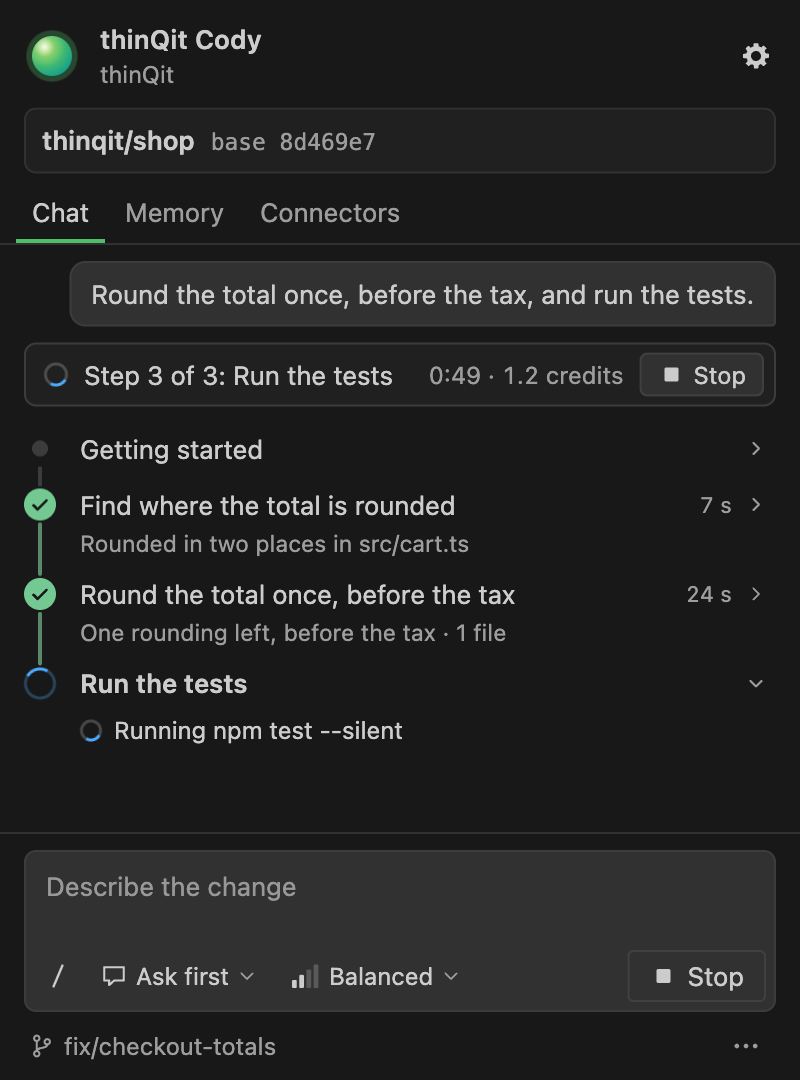
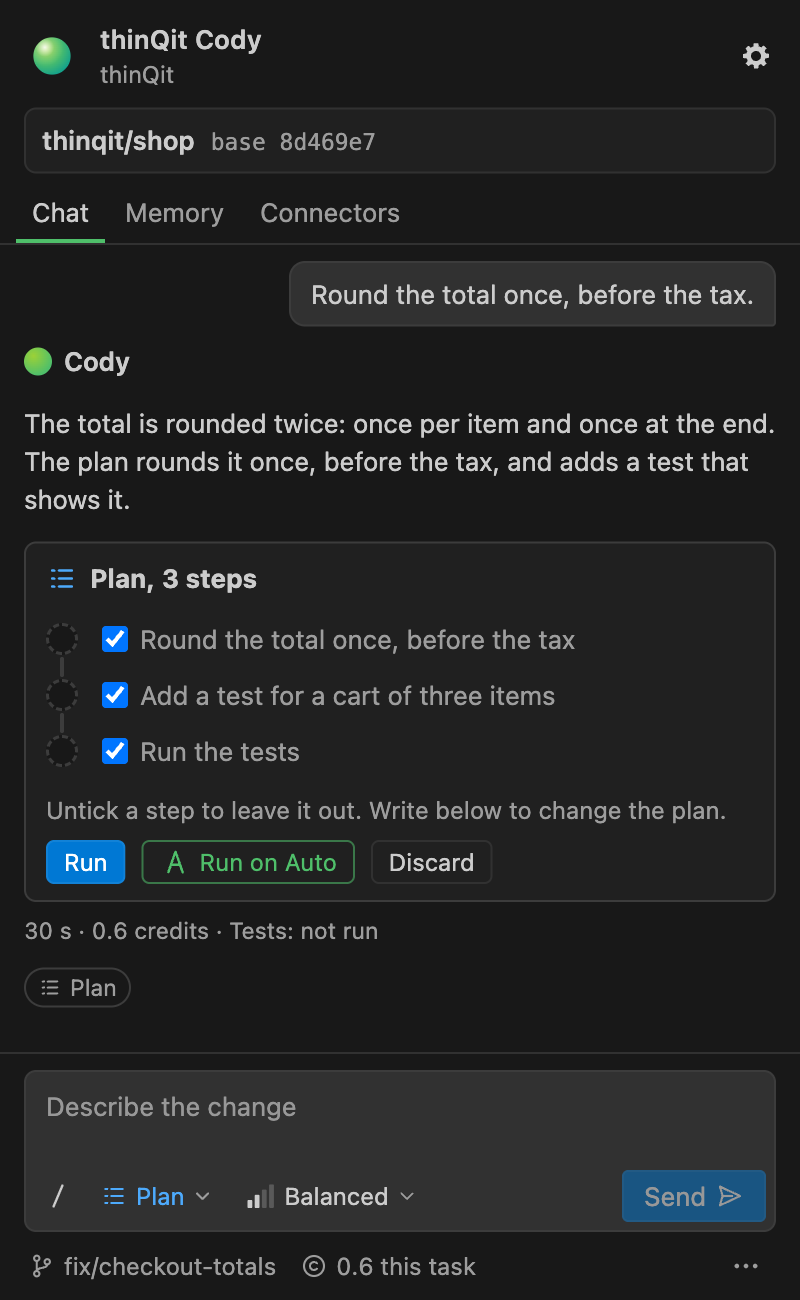
Cody lives in your editor.

Install the thinQit Cody plugin, open your project and describe the change. Cody works on your branch and shows every step as it happens.

  • Plan, Ask first or Auto. You decide how much Cody does on its own.
  • Test driven runs. Cody writes the tests first and shows you the results.
  • Right-click to change the page. Point at any element in the preview and say what to change.
  • Merge conflicts handled. Cody pulls, merges and explains what it kept.

Pick a Q-plan. Get more Cody for your money.

Get up to 8x more Cody work than paying per thinQ.
Each plan is monthly, with a weekly allowance.
The allowance resets every Monday. After it, Cody runs on thinQs.
Automatic top up adds 250 thinQs for €25.
It only starts if you agreed at checkout.

Start free
Q-Explore
€9.99a month
Cody work for your moneyup to 1.5x

620,000 thinQit tokens a week.

For trying Cody on real changes in your own repository.

Q-Boost
€29.99a month
Cody work for your moneyup to 3x

3,750,000 thinQit tokens a week.

For developers who hand Cody a few changes every week.

Best valueQ-Max
€119.99a month
Cody work for your moneyup to 6x

40,000,000 thinQit tokens a week.

For teams that let Cody build every day.

Q-Extreme
€399a month
Cody work for your moneyup to 8x

133,333,333 thinQit tokens a week.

For one person who wants the biggest weekly allowance.

Rather pay as you go? thinQ packs of 250, 1,250 or 5,000 thinQs at €0.10 a thinQ.A typical change uses about 75 thinQs.

Cody vs Claude Code, OpenAI Codex and Cursor

Cody vs Claude Code, OpenAI Codex and Cursor
CapabilityCodyClaude CodeOpenAI CodexCursor
Mission MapSee the plan move through your repositoryLive map of services and filesNo repository mapNo repository mapNo repository map
Decision modesChoose how much it does on its ownPlan, Ask first, Auto with risk rulesPlan, ask, auto with a safety checkApproval modes, risk-rated auto reviewAgent, Plan and Ask modes
Smart model routingThe right model for each stepPicks the model for every stepOpus plans, Sonnet builds (opusplan)You pick the model and effortAuto picks a model per request
Two-model reviewAnother top model checks the changeBuilt by one model, checked by anotherCode Review on GitHub, Team plans@codex review on pull requestsBugbot reviews pull requests
Point & ChangePick an element in the live previewRight-click any element, say the changeDrives Chrome, no element pickerClick an element and commentBuilt-in browser, no documented picker
Test-driven runsTests first, results as evidenceTests first, with an evidence reportRuns your tests, no reportCloud tasks show test resultsRuns tests in the terminal
Conflict resolverMerges conflicting changes for youPulls, merges, explains what it keptResolves merge conflictsNot in public docsNot in public docs
Cost per stepSee what each step costs, keep a budgetWeekly allowance and 5-hour windows, then thinQsSession estimate, optional spend limitthinQs with 5-hour allowancesUsage billing, no cap documented
Where it runsWhere you can use itWeb app and VS CodeCLI, IDEs, desktop, web, SlackCLI, IDE, app, web, mobileOwn editor, CLI, web, Slack
Price fromLowest paid plan for one person€9.99 a month, free to start$20 a month (Pro)$8 a month (ChatGPT Go), free tier$20 a month (Pro), free Hobby tier
Built inPartlyNot available or not documentedBased on each product's public documentation, October 2026. Names are trademarks of their owners.

What Cody does

From a plain description to a pull request

Cody works the way a careful teammate would, and you stay in charge of every step.

  1. Maps your repository

    Cody reads the code and shows the services and files on the Mission Map.

  2. Plans the steps

    You see the plan first and choose how much Cody does on its own: Plan, Ask first or Auto.

  3. Writes the code

    Cody changes your files on a branch and shows every step as it happens.

  4. Runs your tests

    Tests run first, the results come back as evidence, and you get a pull request to review.

VS Code plugin

Cody lives in your editor.

Install the thinQit Cody plugin, open your project and describe the change. Cody works on your branch and shows every step as it happens.

  • Plan, Ask first or Auto. You decide how much Cody does on its own.
  • Test driven runs. Cody writes the tests first and shows you the results.
  • Right-click to change the page. Point at any element in the preview and say what to change.
  • Merge conflicts handled. Cody pulls, merges and explains what it kept.

Q-plans

Pick a Q-plan. Get more Cody for your money.

Get up to 8x more Cody work than paying per thinQ.
Each plan is monthly, with a weekly allowance.
The allowance resets every Monday. After it, Cody runs on thinQs.
Automatic top up adds 250 thinQs for €25.
It only starts if you agreed at checkout.

Start free
Q-Explore
€9.99a month
Cody work for your moneyup to 1.5x

620,000 thinQit tokens a week.

For trying Cody on real changes in your own repository.

Q-Boost
€29.99a month
Cody work for your moneyup to 3x

3,750,000 thinQit tokens a week.

For developers who hand Cody a few changes every week.

Best valueQ-Max
€119.99a month
Cody work for your moneyup to 6x

40,000,000 thinQit tokens a week.

For teams that let Cody build every day.

Q-Extreme
€399a month
Cody work for your moneyup to 8x

133,333,333 thinQit tokens a week.

For one person who wants the biggest weekly allowance.

Rather pay as you go? thinQ packs of 250, 1,250 or 5,000 thinQs at €0.10 a thinQ.A typical change uses about 75 thinQs.

See all pricing

Your next change, described in a sentence

Start free, no card needed. Q-plans start at €9.99 a month.